10 Hidden Risks of Fixed-Height Card Layouts (And How to Avoid Them)
Fixed-height cards are a staple in modern web design. They create clean grids, maintain visual rhythm, and make layouts look polished. But beneath that tidy surface lurks a hidden fragility. When content changes—whether through translations, user font adjustments, or editorial updates—these rigid containers can crack. This article uncovers 10 critical issues with fixed-height cards and offers practical solutions to build more resilient layouts.
1. The Illusion of Stability: How Fixed Heights Deceive
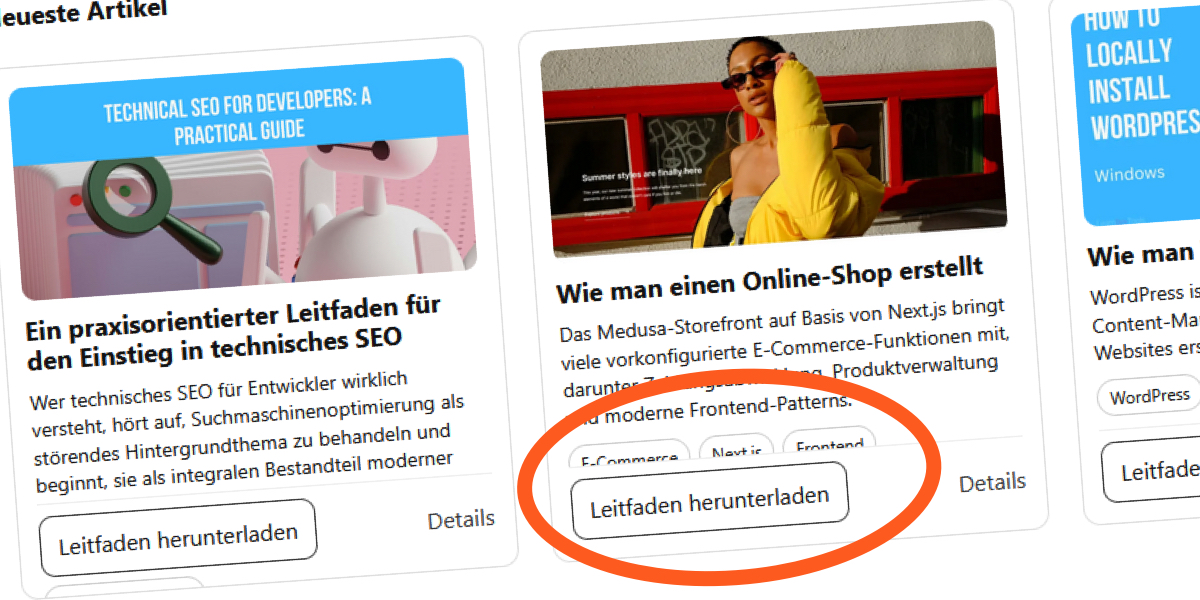
At first glance, fixed-height cards look rock-solid. The designer hands you a mockup where every card aligns perfectly, titles are short, and excerpts fit neatly. You implement it exactly, and it ships without a hitch. But this stability is an illusion. Fixed heights are based on assumptions about content length and browser defaults. The moment those assumptions shift—say, a user bumps up their default font size—the layout starts to buckle. What seemed like a safe choice becomes a trap holding back adaptive content.
2. The Content Update Trap: When Changes Break the Grid
Everything works until an editor updates a headline or adds a few words to an excerpt. Fixed-height containers can’t flex to accommodate the new text. The layout might overflow, clip text, or push elements out of alignment. In a real-world blog section, I saw this firsthand: The design assumed short English titles, so everything fit. But after content updates, titles overlapped or disappeared behind overflow:hidden. The grid that looked pristine in mockups suddenly looked broken.
3. Language Pitfalls: Why Translations Expose Fragility
Translate your content into French, German, or Russian, and fixed-height cards quickly reveal their weakness. German words are often longer, and French uses more articles and prepositions. A title that fits in 20 characters in English may need 30 in German. Without flexible heights, cards either overflow or clip text. The original layout that worked for one language fails for others, making internationalization a headache for developers and designers.
4. Font Size Adjustments: Accessibility Needs Override Assumptions
Many users increase their browser’s default font size for readability—those with low vision, digital eye strain, or just personal preference. Fixed-height cards don’t respect this adjustment. When text grows, the container stays the same size. The result: overlapping elements, cut-off text, or hidden content. This isn’t just a cosmetic issue; it’s an accessibility failure. Users trying to read your content encounter a broken layout instead of information.
5. The Overflow Hidden Safety Net: Masking Real Problems
Developers often use overflow: hidden on fixed-height cards as a quick fix. This hides the visual overflow—text that exceeds the container is simply cut off. But this doesn’t solve the problem; it masks it. Content is still lost to users. In my own project, I set overflow: hidden on card titles and excerpts using line-clamping. The layout appeared fine, but when font sizes changed, text got clipped. Removing the safety net revealed the true failure.
6. Line-Clamping: A Fragile Solution That Fails Under Pressure
Line-clamping (-webkit-line-clamp) is a common technique to limit text to a set number of lines inside a fixed-height container. But this CSS property works only in WebKit browsers and relies on the container holding the same height. When the container is fixed, clamping adds pressure: the browser must decide where to cut off text, often resulting in awkward truncation or missing content. It’s a brittle hack, not a robust design pattern.

7. Competing for Space: Internal Element Conflict
Inside a fixed-height card, different elements—title, excerpt, image, button—compete for the same limited vertical space. Setting a fixed height breaks the natural flow where block elements grow to contain their content. Instead, elements squish together, overlap, or overflow. The browser doesn’t treat this as an error; it just resolves the conflict by clipping. The result is a design that looks controlled but behaves chaotically when real content loads.
8. The Vertical Rhythm Fallacy: Equal Size vs. Real Content
Designers love equal-height cards for the visual rhythm they create. But that rhythm often comes at the cost of content readability. Forcing all cards to be the same height ignores the natural variation in text length. Some cards may have a short title, others a long excerpt. The fixed height might work for one card but ruin another. True vertical rhythm should come from consistent spacing and typography, not from rigid container sizes.
9. Developer-Designer Disconnect: Specs vs. Reality
Design mockups typically use ideal content—short titles, minimal text, default font sizes. The developer implements these exact pixel dimensions. But the designer rarely tests with translated text or accessibility settings. This disconnect leads to fragile layouts that look perfect in static designs but crumble under real-world conditions. Bridging that gap requires collaboration: designers must think about content variability, and developers must advocate for flexible components.
10. Building Resilient Cards: Alternatives to Fixed Heights
Instead of fixed heights, use min-height with height: auto to let cards grow naturally. Combine that with generous padding and consistent spacing. If you need equal heights, consider CSS Grid’s align-items: stretch or flexbox’s alignment properties. For truncation, use a fade-out gradient or progressive disclosure (like “read more” links) rather than clipping. Test your layouts with different languages, font sizes, and zoom levels. Resilient cards adapt to content, not the other way around.
Fixed-height cards may look elegant in a mockup, but they trade visual consistency for real-world flexibility. By understanding these 10 risks, you can design components that honor content, support accessibility, and survive the inevitable changes. The next time you see a perfectly aligned grid, ask yourself: what happens when the content grows?