How to Defend Against Software Supply Chain Attacks: Lessons from the CPU-Z Watering Hole Incident
Introduction
On April 9, 2026, a sophisticated software supply chain attack unfolded: the official cpuid.com website was compromised at the API level, silently redirecting legitimate CPU-Z downloads to attacker-controlled infrastructure. For approximately 19 hours, users who downloaded the trusted tool received a validly signed binary bundled with malware. SentinelOne's AI-driven EDR agent autonomously detected and blocked the attack within seconds by analyzing process behavior—not just file signatures. This guide translates that incident into actionable steps for security teams to defend against similar supply chain compromises.

What You Need
- Endpoint Detection and Response (EDR) solution with behavioral AI and automated response capabilities (e.g., SentinelOne)
- Access to process monitoring tools (Windows Event Log, Sysmon, or EDR console)
- Understanding of normal application behavior for common IT tools (CPU-Z, HWMonitor, etc.)
- Incident response playbook for supply chain incidents
- Network traffic analysis capability (optional but recommended)
Step-by-Step Guide
Step 1: Deploy Behavioral Detection Rules
Standard signature-based antivirus cannot catch an attack where the binary is legitimately signed and arrives from a trusted domain. You must enable behavioral detection that flags anomalous process chains. For example, CPU-Z should never spawn PowerShell, which then spawns csc.exe (C# compiler) and cvtres.exe (resource compiler). Create rules or use EDR policies that alert on any unexpected child process from known IT tools.
Action: In your EDR console, configure a rule: "If process cpu_z_x64.exe spawns PowerShell or cmd.exe, trigger high-severity alert."
Step 2: Monitor for Anomalous API Resolution
Malware often bypasses the OS loader by resolving API functions through non-standard methods. In the CPU-Z attack, the malicious payload located system functions without using the standard Import Address Table (IAT). Monitor for processes that dynamically resolve APIs via GetProcAddress on suspicious function names (e.g., VirtualAlloc, WriteProcessMemory) combined with permission changes.
Indicator: EDR telemetry showing Anomalous API resolution—a key signal SentinelOne captured.
Step 3: Detect Reflective Code Loading
Attackers often load executable code directly into memory without writing a file to disk (fileless execution). Look for memory regions with executable permissions that have no corresponding file on disk. In the CPU-ID incident, reflective code loading was a critical indicator.
Check: Use your EDR's memory scanning or event logs for Event ID 7 (Sysmon for driver loaded, but modified). Alternatively, monitor for NtCreateSection with no backing file.
Step 4: Flag Suspicious Memory Allocations
Read-Write-Execute (RWX) memory permissions are a red flag. Legitimate applications rarely allocate RWX memory after initialization. In the CPU-Z attack, the malware requested RWX permissions to stage shellcode.
Alert: Configure your EDR to alert on any process that calls VirtualAlloc with PAGE_EXECUTE_READWRITE permission, especially if the process is a known legitimate tool.
Step 5: Identify Process Injection Patterns
Malware often injects code into a secondary process to hide its origin. Look for a process that creates a remote thread in another process (e.g., using CreateRemoteThread). In the CPU-Z incident, injection was part of the attack chain.
Detect: Enable Sysmon Event ID 8 (CreateRemoteThread) and correlate with parent-child relationships that diverge from the normal application flow.
Step 6: Recognize Heuristic Shellcode Signatures
Automated exploitation toolkits execute a series of sequential operations to prepare the environment—like resolving APIs, decoding payloads, and establishing C2 channels. Use an EDR with heuristics to detect shellcode execution before a full payload runs.
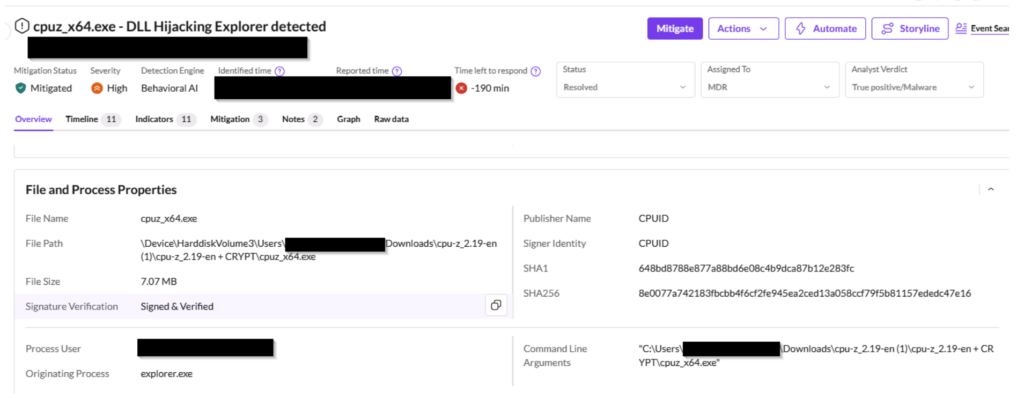
Response: SentinelOne's agent flagged "Penetration framework or shellcode was detected" within seconds, then autonomously terminated and quarantined the involved processes.
Step 7: Integrate Supply Chain Intelligence
The GhostAction campaign (late 2025) showed how compromised maintainer accounts on GitHub and NPM can push malicious code that appears legitimate. Extend your detection beyond endpoints: monitor commit logs, package integrity, and download infrastructure. When a trusted developer's identity is used, intent is subverted—rely on behavior, not identity.
Action: Subscribe to threat intelligence feeds that share indicators of compromise from supply chain incidents, and update your detection rules accordingly.
Step 8: Automate Response
Manual analysis is too slow for supply chain attacks that can spread in minutes. Deploy automated quarantine rules in your EDR that block or kill any process chain exhibiting multiple behavioral indicators (e.g., anomalous API + reflective loading + RWX allocation). SentinelOne's autonomous response stopped the CPU-Z attack within seconds, preventing lateral movement.
Configuration: In your EDR, create a policy: "If 3 or more behavioral indicators from the CPU-Z attack pattern are matched, automatically isolate the endpoint and terminate the process."
Tips & Conclusion
- Trust but verify: Even a valid digital signature does not guarantee safety. Always monitor what a process does, not just who signed it.
- Know your baseline: Document the normal behavior of every critical application (spawned processes, network connections, memory usage). Deviations become obvious.
- Practice incident response drills: Simulate a supply chain attack scenario—a trusted tool executing abnormal child processes—to test your detection and response times.
- Segment your network: Even if an endpoint is compromised, limit the blast radius by restricting outbound connections to only necessary domains.
- Keep your EDR updated: Behavioral detection models evolve. Ensure your solution receives continuous updates to counter new attack techniques like reflective loading or living-off-the-land binaries.
The CPU-ID watering hole attack demonstrates a systemic shift: attackers now subvert the trust that users place in legitimate software sources. By implementing these steps—behavioral monitoring, anomaly detection, and automated response—you can defend against supply chain attacks that bypass traditional defenses. Remember, the next attack will work the same way: it will look exactly like normal behavior until you look deeper.