7 Ways Fixed-Height Cards Can Break Your Layout (And How to Avoid Each)
Fixed-height cards often appear as the cleanest design choice—a perfect grid where every element aligns, titles are short, and excerpts fit neatly. But this visual harmony relies on a fragile assumption: that the content will never change. When editors update copy, translations introduce longer words, or users adjust their font size for accessibility, the carefully constructed layout can crumble. This article explores seven common failure points of fixed-height cards and offers practical solutions to keep your designs robust.
1. The Illusion of Perfect Alignment
Design mockups typically use ideal content—short titles, concise descriptions, and exact pixel dimensions. When you implement exactly as specified, everything looks stable. But this stability is an illusion. The moment the real-world content varies from your sample, the fixed heights become a cage that traps or truncates your text. The designer’s perfect grid only works with perfect data.
2. Content Changes: The Silent Disruptor
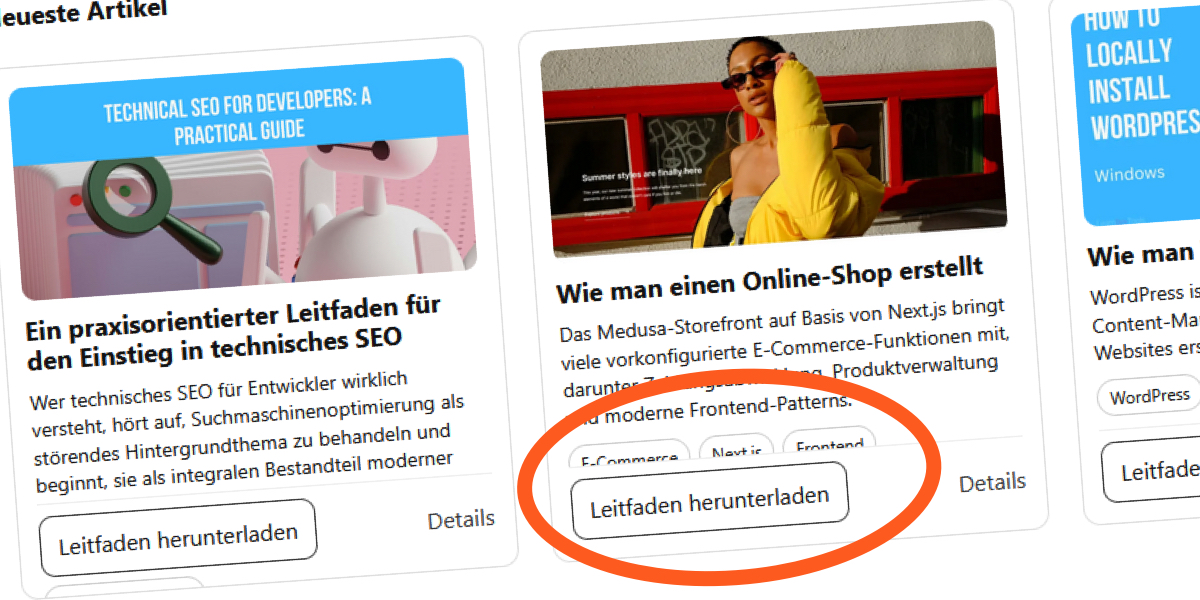
In a live site, editors update titles, add longer excerpts, or replace images. A title that once fit two lines now spills into a third. With a fixed-height card, that extra content either gets clipped (if you set overflow: hidden) or overflows into adjacent elements. Either way, the visual harmony breaks. The card no longer aligns with its neighbors, and the grid loses its intended balance.
3. The Translation Trap
Languages like French, German, or Spanish often require more characters for the same meaning. For example, an English title “Recent News” might become “Actualités récentes” in French, which is longer. In a fixed-height container, this forces text to wrap more aggressively, increasing vertical space and likely exceeding the specified height. The result? Clipped words or collapsing layout—a common issue for multilingual websites.
4. User Font Size Adjustments
Many users increase their browser’s default font size for readability—especially those with low vision or digital eye strain. When you set a fixed height in pixels, your text grows while the container stays rigid. This creates internal pressure: text blocks expand but can’t escape, leading to overlapping, truncated content, or misaligned elements. Accessibility shouldn’t break design.

5. CSS Line Clamps Offer False Safety
Common techniques like -webkit-line-clamp limit text lines, but they rely on overflow: hidden to hide the excess. While this keeps the card visually tidy, it throws away content. Readers may miss important information. Moreover, line clamps only work in WebKit browsers; other engines ignore them entirely, exposing raw overflow. It’s a band‑aid, not a solution.
6. Overflow Hidden Masks the Problem
Setting overflow: hidden on fixed-height cards simply hides the symptom, not the cause. Remove that property, and you’ll see text spilling out, breaking margins or overlapping with neighboring cards. The failure is merely invisible. When debugging, always disable overflow: hidden to see the real extent of content pressure.
7. Better Alternatives Exist
Instead of fixed heights, use min-height so cards can grow as needed. Combine with consistent padding and automatic vertical alignment (e.g., flexbox with align-items: stretch) to maintain a tidy grid. For truly equal heights, wrap cards in a flex container and avoid setting explicit heights. This keeps the layout stable while respecting real content.
Fixed-height cards might look clean in a mockup, but they introduce fragility that can break under real-world conditions. By replacing rigid heights with flexible alternatives and testing with varied content, you can build layouts that remain robust—no matter what your users or editors throw at them.