gThumb 4.0 Alpha: A Radical Makeover with GTK4/libadwaita and Modern Features
Introduction: A New Chapter for gThumb
For years, gThumb has been a reliable open-source image viewer and organizer for Linux enthusiasts. But the recently released gThumb 4.0 alpha is not just another update—it's a complete reinvention. The application has been rewritten in Vala and ported to GTK4 with libadwaita, resulting in a user interface that is barely recognizable from its predecessor. While the visual overhaul steals the spotlight, the alpha also introduces practical new features like WEBP and PNG animation support, JPEG XL (JXL) export, and a versatile censor filter. Let’s dive into what makes this release a game-changer.

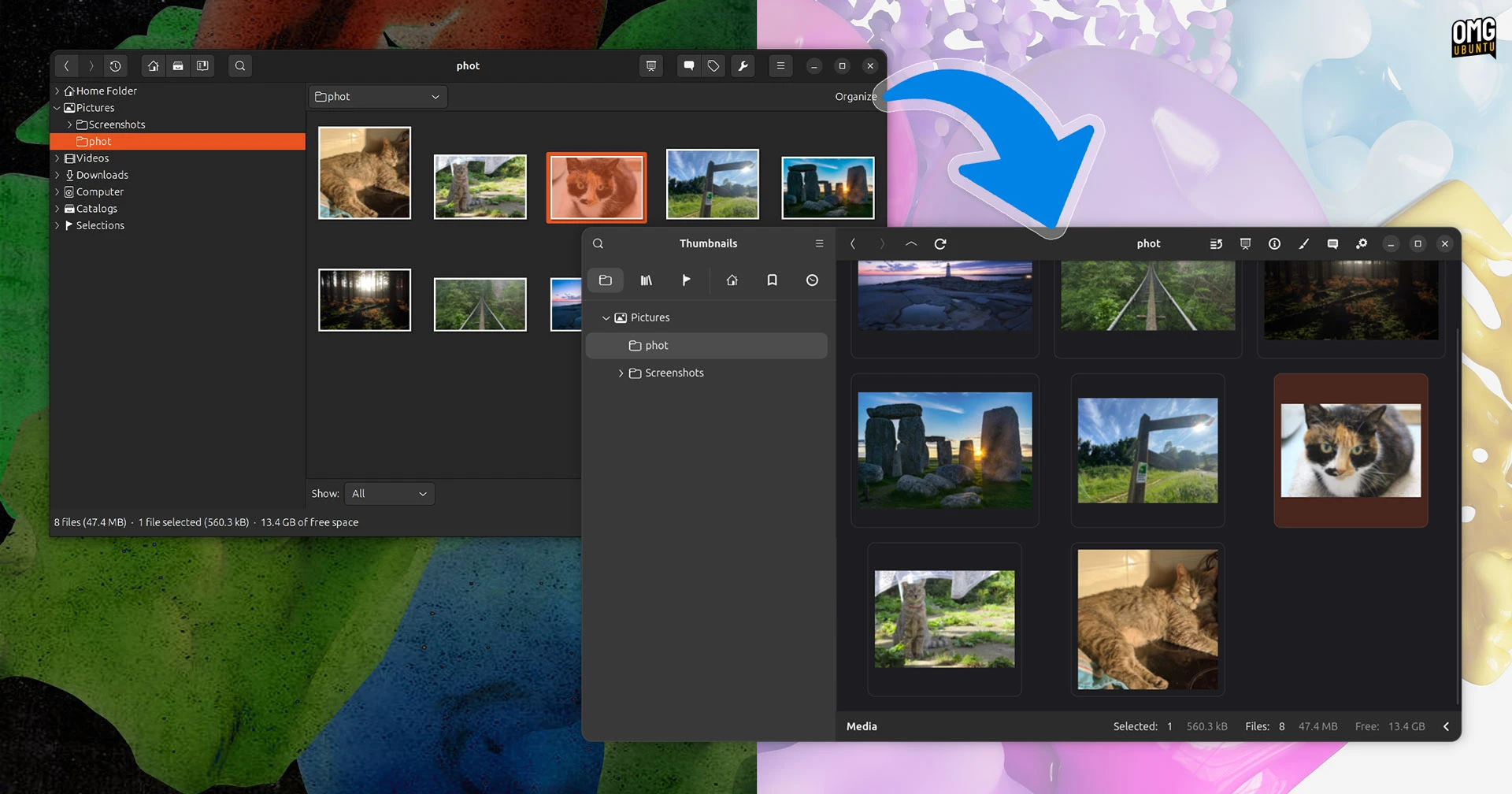
Visual Revamp: GTK4 and libadwaita Bring Modernity
The most striking change in gThumb 4.0 is its visual transformation. Migrating from GTK3 to GTK4 alone adds a fresh, modern look, but the integration with libadwaita (libadwaita is the GNOME design library) takes it a step further. The new interface feels clean, adaptive, and consistent with the latest GNOME applications. However, as the developers note, a GTK4 port doesn’t automatically look amazing—it requires careful design. gThumb 4.0 proves that the team has put significant effort into crafting a cohesive and intuitive UI.
What Changed?
- Toolbar & Menus: The classic toolbar has been replaced with a streamlined header bar, reducing clutter.
- Sidebar: The folder tree and album view are now more spacious and responsive.
- Color Scheme: Adopts the adwaita light/dark themes seamlessly, respecting system preferences.
- Icons & Spacing: Larger, clearer icons with improved padding enhance readability.
New Features: Beyond the Surface
Under the hood, gThumb 4.0 packs several functional upgrades that answer long-standing user requests. These additions make the tool more versatile for both casual users and photographers.
WEBP and PNG Animation Support
With the rise of modern image formats, WEBP has become a favorite for its compression and transparency. gThumb 4.0 now natively opens and displays WEBP images, including animated WEBP files. Similarly, PNG animations (APNG) are fully supported. This eliminates the need for separate viewers or converters when handling these formats.
Export Images in JPEG XL (JXL)
The JPEG XL format is gaining traction for its lossless compression and high dynamic range. gThumb 4.0 allows you to export images to JXL, future-proofing your media library. This feature is especially useful for professionals archiving high-quality photos without sacrificing storage space.
Censor Filter: Pixelate or Blur
A practical new tool is the censor filter, which lets you pixelate or blur selected areas of an image. Whether you need to hide faces, license plates, or sensitive data, this filter works in a few clicks. It’s a valuable addition for privacy-conscious users and content creators.
Under the Hood: Rewritten in Vala
The migration to Vala is a significant technical decision. Vala compiles to C and offers modern language features while maintaining high performance. For gThumb, this means a cleaner codebase, faster execution, and easier maintenance. Combined with GTK4, the application feels snappier and more responsive even on older hardware.
What This Means for Users
The gThumb 4.0 alpha is a dramatic departure from the classic gThumb 3.x series. Longtime users will need to adapt to the new layout, but the learning curve is gentle. The integration with GNOME’s design language makes gThumb feel like a native application rather than a third-party tool. For those who value consistency, this is a major plus.
Should You Test the Alpha?
Alpha software is by nature unstable, but adventurous users can try the build from the official GitHub repository or PPA. Expect occasional bugs and missing features—some plugins from the old version may not work yet. However, the core functionality (viewing, organizing, basic editing) is solid.
Conclusion: A Bold Step Forward
gThumb 4.0 alpha is more than a facelift—it’s a fundamental reimagining of a beloved open-source tool. The combination of GTK4/libadwaita, Vala, and new features like WEBP/APNG support, JXL export, and a censor filter positions gThumb as a modern image manager. While the old UI may be missed by some, the improvements in performance, aesthetics, and functionality make this a worthwhile upgrade. Keep an eye on the development progress; the final 4.0 release promises to set a new standard for Linux image viewers.