Managing Python Environments in VS Code Just Got Easier: The New Unified Extension
Python developers working in Visual Studio Code now have access to a streamlined and unified workflow for managing environments, interpreters, and packages. The newly released Python Environments extension brings much-needed consistency to what was once a fragmented landscape of tools like venv, conda, pyenv, Poetry, and Pipenv. After a year-long preview shaped by community feedback, the extension is now generally available. Over the next few weeks, all environment workflows will automatically switch to using this extension, though users can enable it immediately by toggling the setting python.useEnvsExtension. Best of all, it works alongside the existing Python extension and requires no additional setup—simply open a Python file, and your environments are discovered automatically.
A Unified Approach to Environment Management
The extension automatically discovers environments from all major managers, including:
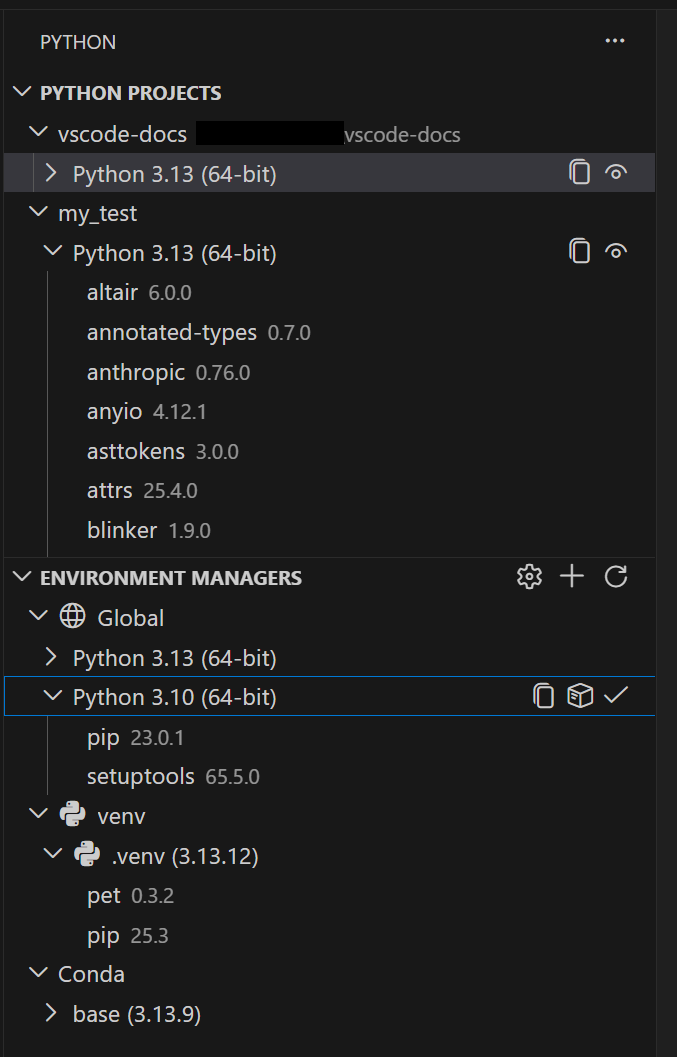
- venv
- conda
- pyenv
- Poetry
- Pipenv
- System Python installs
Powered by PET – Speed and Reliability
Under the hood, discovery is handled by the Python Environment Tool (PET), a fast Rust-based scanner that reliably locates environments across all platforms by checking your PATH, known installation directories, and configurable search paths. PET already powers environment discovery in the standard Python extension, so this is the same proven engine—now with a dedicated user interface built around it. You can create, delete, switch, and manage environments from a single UI, regardless of which tool originally created them. For most users, everything works out of the box. If you store environments in non-standard locations, you can configure workspace-level search paths using glob patterns, or define global search paths for shared directories outside your workspace.
Creating Environments with Ease
Faster Environment Creation with uv
If you have uv installed, the extension automatically uses it to create venv environments and install packages. This provides a significant speed boost, especially in large projects. The feature is enabled by default through the python-envs.alwaysUseUv setting.
Quick Create and Custom Create
Getting a new environment running is now just a click away. Quick Create (the + button in the Environment Managers view) builds an environment using your default manager, the latest Python version, and any workspace dependencies found in requirements.txt or pyproject.toml. You get a working environment in seconds.

When you need finer control, Custom Create (accessible via Python: Create Environment in the Command Palette) lets you choose your environment manager, Python version, environment name, and which dependency files to install from. Both venv and conda support creating environments directly from VS Code; for other managers like pyenv, Poetry, and Pipenv, the extension discovers environments you create with their respective CLI tools.
Python Projects: Environments That Match Your Code Structure
For developers working with monorepos or complex folder structures, the Python Projects feature allows you to map environments to specific folders or files. This solves a common headache in multi-project workspaces, ensuring that each directory or file uses the correct environment. The mapping is configurable and helps maintain clear boundaries between different projects and their dependencies.
In summary, the Python Environments extension simplifies one of the most fiddly aspects of Python development. By unifying discovery, creation, and management under a single interface—and accelerating tasks with tools like PET and uv—it makes working with environments in VS Code faster, more reliable, and far less frustrating. To get started, just install the extension (or wait for the automatic rollout) and open any Python file; everything else follows seamlessly.